Updates from the build
What changed, on the day it did, and what to go and look at. Each entry describes the stage the work had reached on that date, in the words used to test it.
24 updates · Sep 15 – Sep 17, 2026
2026-09-17 · 13 updates
- Riding
Get on, ride, get off
Walk up to a horse and press E. It stands still for you and you climb on from whichever side you are standing on. Look down and you see its ears, head and mane.
Ride with W and steer by looking. Shift steps up a gait — walk, trot, canter, gallop — and Ctrl steps down; Alt looks around without steering. A gallop is about 34 km/h, turns wide at speed and goes around trees rather than into them. E gets you off: the horse slows first and you step down beside it.
In third person you put your left foot in the stirrup, lean in over the saddle as you spring up and swing your right leg over its back before you sit. Getting off runs the same way in reverse.
TryPress F3 for third person, get on, and watch the mount from the side.
In the development build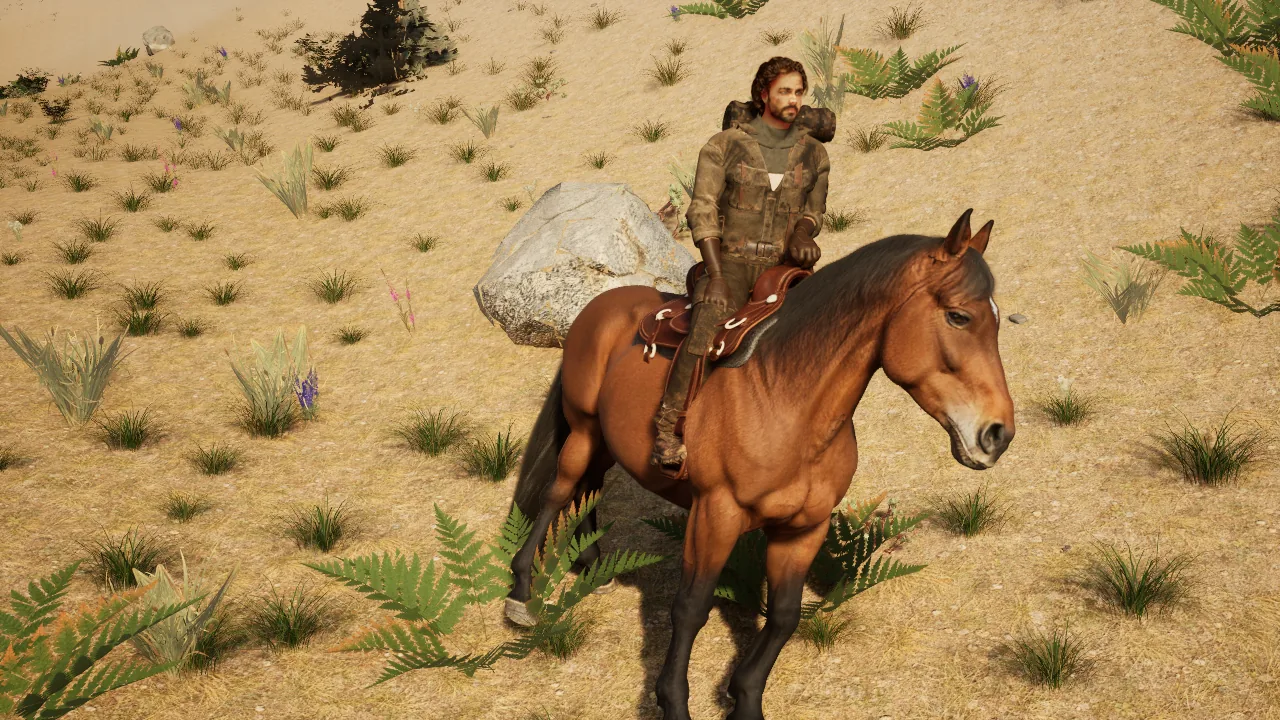
Development capture · Seated in the saddle, the day riding reached the build - Riding
Hooves that land where they should
Each hoof now lands in a real walking order, is laid flat only on the ground it actually stands on, and stays planted where it lands. As the horse speeds up the legs stride longer rather than faster. In the air a hoof keeps the line of its own leg instead of twisting its sole toward the ground below.
The rider moves with it: hips sway with the back at a walk, you rise and sit on alternate beats at a trot, sit deep at a canter, and stand in the stirrups leaning forward at a gallop. The saddle faces the right way, horn in front, your boots stand in the stirrups and your left hand holds the horn with the fingers closed around it.
After a long gallop, stop and watch the horse blow. Its breathing is quick and deep and settles over a minute or two, and a tired horse carries its head low.
TryCanter, then jump a log, and watch the front legs fold and the fetlocks stay clear.
In the development build - Riding
Dust, prints, sweat and sound
Gallop across dry ground and look back. Dust kicks up off every hoof and hangs in a trail behind you, thickest on sand and dirt and barely any on rock or grass. The horse leaves a line of hoof prints in dirt, sand, snow and grass that stays about a minute and then weathers away. Through a stream the hooves throw spray; in snow they kick up powder; rain damps the dust. Pull up hard on grass or soil and it tears clods out of the ground.
Every hoof you see land makes its own sound: the four-beat walk, the two-beat trot, the drumming of a canter and gallop, soft thuds on the forest floor, clops on rock, crunch on gravel, splashes in water. At a gallop the horse blows out once with every stride and you hear the wind rise in your ears. The saddle creaks at a walk and the bit jingles from a trot up.
Keep galloping for a minute or two and its coat goes darker and glossy with sweat, then dries over the next few minutes. Canter at a fallen log or a low rock and it jumps by itself, taking off at the right moment and landing heavily to gallop on; press Space at a trot or faster to jump when you like. Walls and trees it will not try.
TryRide from dirt onto rock and back with the sound on.
In the development build - Riding
Whistle, and it comes
Ride a horse for a while and it becomes yours; the longer you ride, the stronger the bond, and it remembers you after you save and load. Get off, walk well away and press H. You whistle, the horse throws its head up toward you with a snort, canters while it is far, slows to a walk, and pulls up beside you with its left side to you, facing about the way you face, so you can get straight on. It finds its way round trees and rocks, and if there is no way through it comes as close as it can and waits.
Left alone, your horse stands a little while, then drops its head and grazes, now and then walking a few steps to fresh grass, and stays within a few metres of where you left it. Walk back toward it and it lifts its head and turns its ears on you. Walk into its back end and it steps away and swings round instead of standing like a wall.
Only its owner can ride it, so another player cannot take it. If the wolf comes within a few metres, the horse whips round and bolts at a gallop for a few seconds.
TryWhistle from the far side of a stand of trees and watch which way it comes round.
In the development build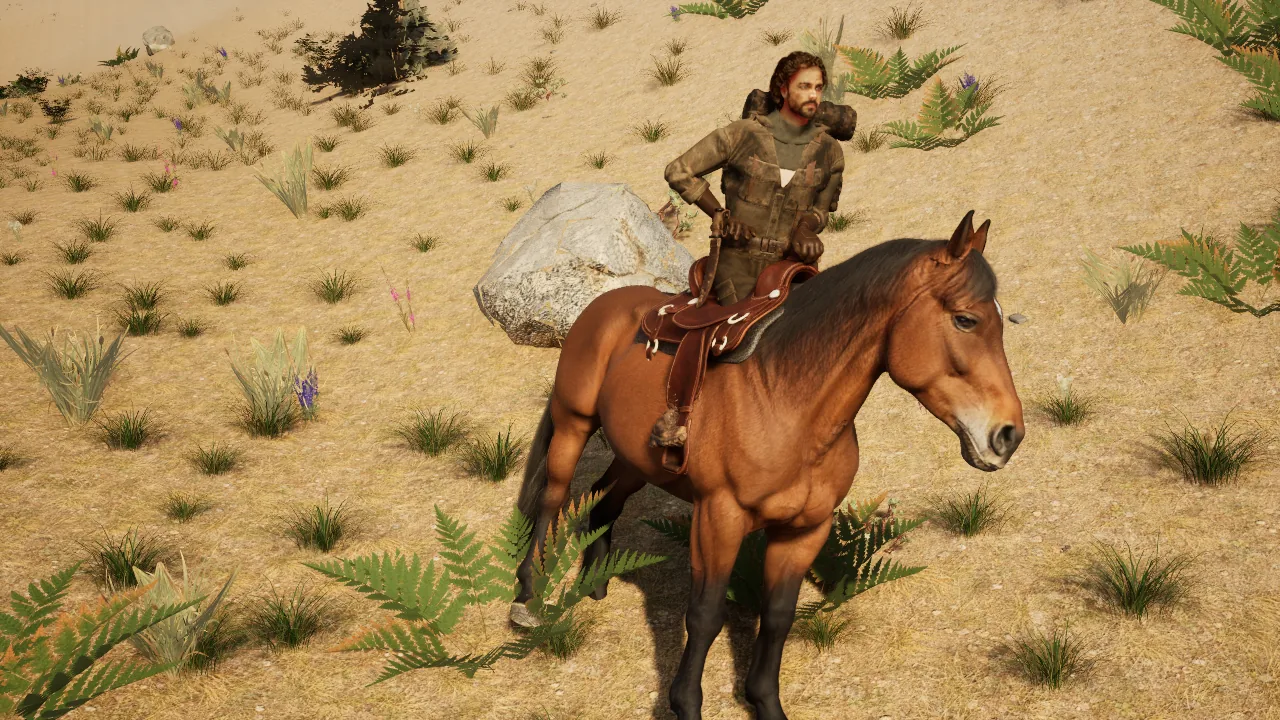
Development capture · Mounting from the near side - Tools & gathering
Five axes chop on the body
In third person the felling axe now chops on your body, and the chop lands on the tree you are looking at, including thin ones. The bearded axe, the bronze axe and the greenstone war axe got the same chop fitted to their shorter handles, and the stone axe you start with can fell trees too — the fifth axe in the family.
None of these swings was animated by hand. The system that built the felling axe’s chop built the rest from each axe’s own measured shape and weight, and it knows where you actually hold the knives, dagger, sickle and mallet, so it will not give those an overhead two-handed swing when their turn comes.
A swing at nothing follows through in front of you instead of stopping dead in the air. Aim at a rock or the ground within reach and it still stops where it lands. The body will not strike behind itself.
TryHold each axe in turn, press F3, and chop the fir by the start camp.
In the development build - Tools & gathering
Trees fall in a few hits
The fir by the camp falls in three blows now, not eleven. A tree breaks where your axe cut it and falls over from there, hinging on the far side of the cut, and the stump left behind is the tree’s own trunk up to your cut.
Look down at the stump: the cut face is real end grain — wood fibre, drying cracks and the torn edge an axe leaves, over growth rings measured off that trunk at the height it actually broke. A thick fir shows many fine rings and a sapling a few wide ones, and they drift off-centre the way real end grain does rather than sitting in a perfect bullseye. No two stumps are the same, and other species tint the grain toward their own wood.
The stretched bark on the two broken pieces is still to come.
TryChop the fir, walk up to the stump and look down, then walk to the end of the log.
In the development build - Tools & gathering
A two-handed strike, generated
Swing the pickaxe in third person and the survivor does a real overhead strike: the pick goes up over the head, trails behind the hands on the way down, both hands meet at the butt for the blow, hips go back and knees bend, eyes stay on the rock, then the pick is levered out. The sledgehammer swings the same way. Nothing here was keyed by hand, bought or recorded: the motion was generated on each survivor’s own skeleton within real human joint limits, and the male and female survivors each have their own.
Hold the left mouse button to keep swinging. A blow that sticks in the rock is wrenched out with the hand still on the handle, not teleported out, and a pickaxe no longer hangs in the rock behind you when you walk away after a hit.
Known for now: a rock far to the side, very low or very high still mines, but the pick visibly misses it. Strike variants come next.
TryPress F3, walk while you swing at a waist-height boulder, and watch the legs keep walking.
In the development build - Characters & movement
One hand, and it is yours
There is one hand now, and it is the same glove your character wears, holding every tool. Take out the pickaxe, then the axe, then the hatchet, then the knife: the hand is the same one each time. It used to be a different glove for the pickaxe and a separate baked one for each of the other twenty-three tools. Hold nothing and you still have a hand, loosely open at your side.
Press F on anything to bring it up close and look at the fingers. They close on that item’s own handle, because the handle was measured off the item’s mesh: a thin knife handle is gripped tighter than a thick pitchfork shaft, and nobody authored either. The knives and the dagger are held by the handle, blade up out of your fist; the sickle and the mallet by the handle below the crescent and the head. The thumb closes across toward the index finger, not down toward the wrist.
The glove is joined to your arm, shirt sleeve and all, through the whole inspect turn, and the sleeve changes with your shirt. In third person the body’s hand closes on the pickaxe the same way.
TryHold the flint knife and press F; then the pitchfork.
In the development build - Characters & movement
Worn leather gloves
Close up, your gloves are worn leather now: a pebble grain, a polished grip, knuckle scuffs, the panel and the steel buckle, matching the rest of the kit. The fingertips are the most worn part, only a shade or two lighter than the leather beside them and still clearly dark brown. In the first pass they came out so pale they read as bare skin — measured at about five times brighter than the surrounding leather, within a few percent of the survivor’s own face — and were repainted.
The gloves reach up under the rolled sleeve, with no bare band of wrist between glove and shirt, and taking clothes off and putting them back on keeps the face, chest and hands drawn however long you have been playing.
TryLook down at your hands, then press C and look at the thumb and index tips with the light across the back of the hand.
In the development build - Interface
Tap F2 for a clean screenshot, hold it for a GIF
Tap F2 anywhere in the world: a soft flash, a click, and a card in the top right with the picture. The image is the clean world, with no HUD, compass or hotbar, taken the moment the key went down. It is saved to Pictures › Farwilder and put on the clipboard, so it pastes straight into a chat.
Hold F2 and a ring fills and recording starts from the moment you pressed. Let go straight away and it keeps recording hands-free, so you can walk, swing and look around; press F2 again to stop. Hold past about a second and letting go stops it instead — the bar under the timer always says which. A recording stops by itself at fifteen seconds, the finished GIF is copied as a file, and it is shrunk until it fits under a 10 MB attachment limit.
Open the inventory or the map and tap F2 and that screenshot includes the menu. F2 no longer turns the world flat and unlit, which was the engine’s own debug key.
TryHold F2, let go, ride somewhere, and press F2 again.
In the development build - Interface
Every item has a real icon
Every item in your pack now shows a picture of its own model, lit and graded like the felling axe or the shovel. The stone pickaxe, the stone axe and the torch no longer show painted pictures, and neither do sticks, plant fiber, rope, berries, yarrow, raw meat, cloth, bandage, hide, feather, wood, chamomile, fern or acorns. Cooked meat and charcoal had no icon at all before; they have one now. The clothing icons were graded to match, so the pack and the character panel use the same pictures.
The tool icons read as one family again — the brightest is one and a half times the darkest where it used to be three — and a long item name tightens its letter spacing, then its size, so it fits on one line inside the item details panel instead of running over your character.
TryOpen the pack and look along the tools, materials and food at hotbar size.
In the development build - Interface
The pack holds 120 things
The pack holds 120 things now, not 30. The grid still shows thirty slots at a time; roll the mouse wheel over the pack to move it a row at a time, and the thin copper line down its right edge shows where you are. Picking another filter starts the grid at the top again. Existing worlds load with everything where it was, in the first thirty slots.
With the pack completely full, taking a garment off still asks you to make room first: clothes have no model to lie on the ground yet, so dropping them at your feet would make them vanish.
TryRoll the wheel down to the bottom row and back up.
In the development build - Worlds & saves
Old worlds open again
Eighteen of the thirty-six worlds in one long-running world list had been made by an older version of the world generator and refused to load. They open now, with today’s land: you keep your inventory and start on clear ground close to where you saved, or at the world’s start if that spot is now water or cliff.
A world also remembers which generator made it, and mined ore keeps its place through world updates. Each ore deposit is named by what the seed decides, so a change to the generator can never hand one deposit’s mined state to another.
A second generator that had been built alongside the first has been taken back out. Its good parts — creek banks, meadows, oak and granite ground, better water — are being rebuilt into the normal generator one at a time, so they show up in every world rather than in a switched-off one.
TryLoad the oldest world in your list.
In the development build
2026-09-16 · 3 updates
- Characters & movement
The backpack and its straps
Take the backpack off and the two leather straps across your chest come off with it, as one item; put it on and they come back. The straps had been a garment of their own, so they stayed on your chest when the pack came off.
Every accessory has its own box now. The neck scarf, the knife sheath, the rope and the belt used to share one accessory box, and a box only takes off whatever is in its first slot, so you could not take the rope off without the rest. Down the right of the portrait: backpack, neck, knife, rope, belt. The head box is genuinely empty until you wear a hat.
TryTake the rope off and leave the knife on.
In the development build - Characters & movement
The survivor stands still in the panel
Run, jump, strafe, then open the pack: the portrait shows the last calm stance it saw you in, not the stride your legs were in when you pressed the key. That frozen mid-stride pose — legs apart, an arm swung out — was the one that looked stretched. The portrait now starts below the rule under its own heading, so your head no longer crosses the line.
Zoom on the face in the panel or in third person and the beard is a soft full beard, not a flat blocky patch, and the hair reads as strands. In third person the hair stays on his head after the pack closes; until this it vanished the moment the pack shut and he walked around bald.
TrySprint, open the pack, and look.
In the development build - Wildlife
A saddle that is a seat
The western saddle is a real seat on the horse’s back, about as long as the withers, with skirts that wrap the barrel — not a box around it. Walk around a sheep and it glances at you once, then grazes; it no longer keeps turning its rump toward you. The horse walks as soon as it moves and never slides on idle.
On the forest floor, tap E on a fallen branch, a loose stone or a stand of fireweed and it goes in the pack and stays gone after you quit.
TryWalk a slow circle around the horse.
In the development build
2026-09-15 · 8 updates
- Wildlife
Two hens by the start
Two brown hens live near where you start, beside the sheep, the wolf and the horse. Hold a stone, wind up with Shift and the right mouse button, and throw it at a hen: one full throw kills it, it drops where it was hit, and its body goes limp so its legs and head come to rest on the ground. Walk up and press E to harvest one raw meat and two or three feathers.
On a hillside a dead hen tumbles a little, slows, and settles within about half a body length of where it fell, so the harvest prompt and the body are in the same place. A living hen’s feet follow its own walk and idle: an earlier build could stretch a foot eighty metres across the world for one frame in three, which screenshots missed and a per-frame check now catches.
TryThrow at a hen standing on a slope and watch it roll and settle.
In the development build - Survival
Cook over a campfire
Put raw meat on a lit fire and it comes back as cooked meat after forty-five seconds. Leave it on too long and it comes back as charcoal.
Throw a stone: break a rock, pick its stones up with E, put them on the hotbar with the scroll wheel, then hold Shift and the right mouse button to wind up and let go to throw. The longer you hold, the further it flies. The stone flies with its real weight and the air’s drag, stops where it hits the ground, a tree or a rock, and E picks it back up where it lands.
TryCook a hen’s meat, then leave the second piece on the fire and see what comes back.
In the development build - Interface
Graphics settings that change the picture
Quality now really changes the picture. Epic is the default and the intended look, with every renderer value checked against the previous night’s. Choose Low and press Apply for softer shadows, simpler reflections, a frame drawn at 67% and upscaled, and no hair on anyone — on purpose, for slower machines. Render scale works too, at 100, 83, 67 and 50. Before this the row did nothing, and pressing Apply could have quietly dropped the graphics to Medium.
A new creative tab in the pack lists every item in the game; give yourself one or fifty, type a name to filter the list, and every give is a server request that is counted. Old worlds in the world list now say they need a different game version instead of saying the save is damaged.
TryLow, Apply, look at the shadows; Epic, Apply, look again.
In the development build - Weather & light
The sun is the right size
The sun had been drawn two and a half times too wide, which softened every shadow edge. It is the right size now, so shadow edges are what a real sun gives. The world is also a stop brighter, at the exposure chosen from five side-by-side frames.
Rain, storms and wet ground are in the build and stay off unless a launch asks for them. The whole daylight — sun, sky, haze, clouds, fog and shadow softness — now comes from one editable file, so a new look is a one-file change.
TryStand in the forest at midday and look at a shadow’s edge.
In the development build - Characters & movement
His face, from the reference
The male survivor has the face fitted to its reference sheets, with skin taken from them: beard, moustache, sideburns, brows, dirt and tan. His hair is a swept-back wavy cut in a real brown, and his mouth keeps the reference’s firm set; the game had been dropping every expression shape. Open the inventory to see him up close.
The stone axe you start with has a real model — a polished grey-green stone head set through an ash handle and bound with rawhide, 58 cm long. Its look began as a generated image and still has to be edited and approved before the game ships.
TryOpen the pack and look at the character panel, then double-click the stone axe.
In the development build - Multiplayer
You receive only what you could know
In a shared world, each player’s machine now receives only what that player could know: their own things, what lies within about a kilometre of them, and what everyone may see, such as the time of day. Other players’ hunger and thirst, a stone someone dropped far away, and which distant rocks have been mined no longer reach your machine at all — so a cheat reading the game’s memory cannot find them. Before this, every machine was told about every rock anyone mined anywhere.
A stone someone picks up, a tree they fell or a fire they light shows up for the other players right away. This is groundwork tested with a dedicated server and two connected clients on one machine; there are no public servers.
TryNothing changes in single player.
Built, not playable yet - Worlds & saves
Worlds saved region by region
Underneath, a new way of saving worlds is built and tested: as regions in a small database, the way a server that runs for months must, and tested against crashes. It is switched off until it has proved itself and will convert a world only when asked. Worlds save and load exactly as before.
The game also builds into a standalone copy that runs outside the editor with the normal launch settings and passes the full mining test there. That copy stays on one machine for now.
TryNothing to try yet.
Built, not playable yet - Characters & movement
A female survivor, switched off
A female survivor is in the game with her fitted face, photographic skin and a braid with two ties, and she is switched off: the game still starts as the male survivor, so nothing looks different until she is playing. In third person the braid hangs down her back; the close-up panel still draws her hair strands too thick, so she is judged from third person for now. A key that switches between looks in game comes next.
TryNothing to try yet.
Built, not playable yet